
Why Every Remote Worker Needs a Portable Screen Extender in Their Bag
Remote work has changed the way people think about productivity. A laptop is no longer just a device for checking […]
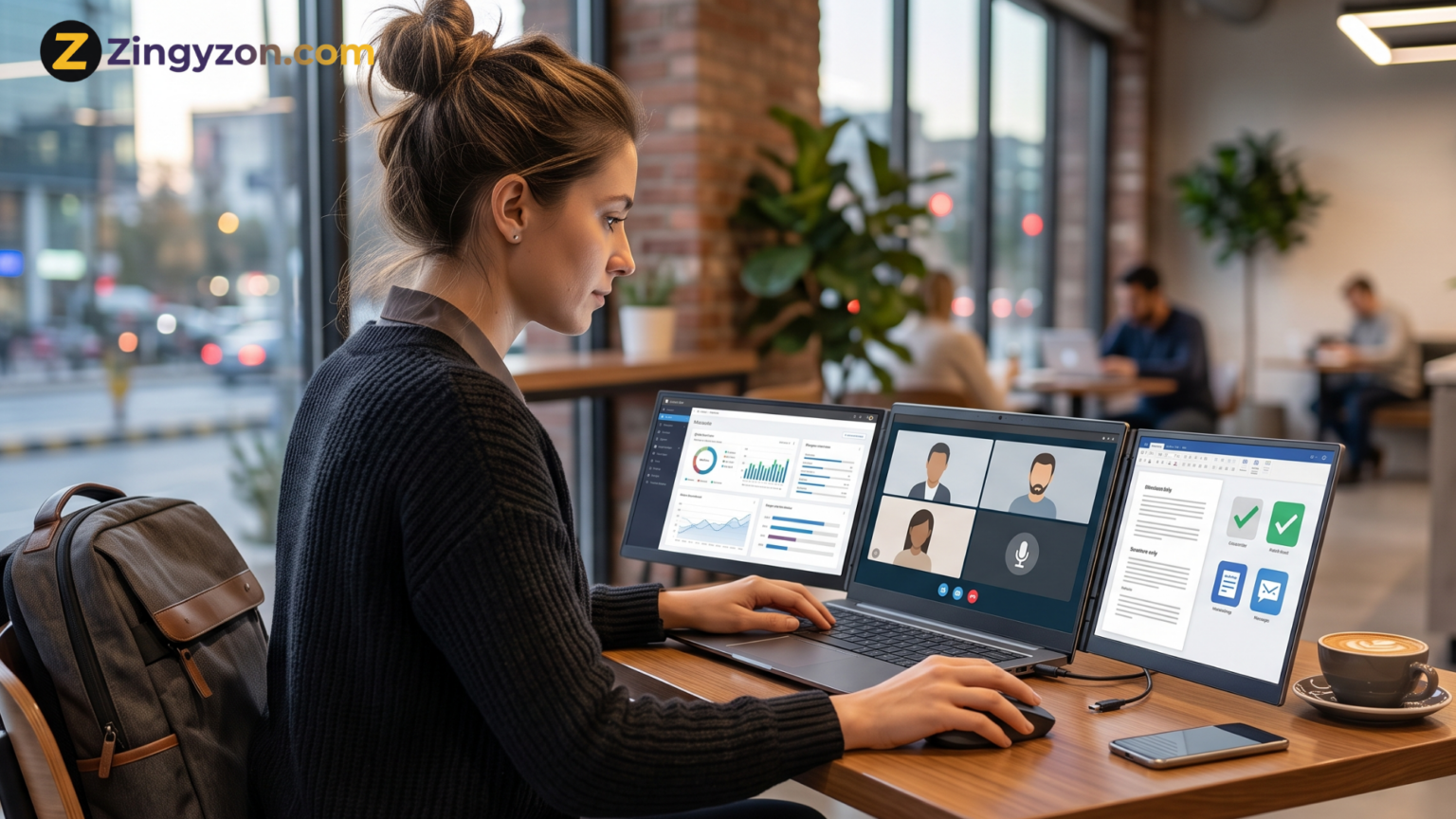
Remote work has changed the way people think about productivity. A laptop is no longer just a device for checking emails or joining meetings. For many professionals, it has become the complete office. Writers, developers, designers, marketers, consultants, virtual assistants, online teachers, project managers, traders, and business owners now work from homes, cafés, hotels, airports, coworking spaces, and even while traveling.
But there is one common problem: a laptop screen often feels too small for serious work. Switching between tabs, documents, dashboards, emails, chats, spreadsheets, and video calls can slow you down. This is why a portable screen extender has become one of the smartest tools a remote worker can keep in their bag.
A portable screen extender gives you extra display space wherever you go. Instead of working on one cramped screen, you can create a multi-monitor setup in minutes. For remote workers who care about speed, focus, comfort, and flexibility, this small upgrade can make a big difference.
What Is a Portable Screen Extender?
A portable screen extender is an external display that connects to your laptop and gives you more screen space. Some models attach directly to the laptop, while others work as standalone portable monitors. Many modern screen extenders are thin, lightweight, and easy to carry in a laptop bag.
The main purpose is simple: help you work with more information at once. You can keep your main task on one screen and supporting tools on another. For example, you can write a report on your laptop while keeping research open on the second screen. You can attend a video meeting while viewing notes. You can edit a spreadsheet while checking data from another document.
For remote workers, this is more than a luxury. It is a practical productivity tool.
Why One Laptop Screen Is Not Enough Anymore
Modern work is rarely limited to one app. A typical remote worker may use email, Slack, Zoom, Google Docs, spreadsheets, project management tools, cloud storage, browser tabs, AI tools, calendars, analytics dashboards, and design software in the same day.
On a single laptop screen, this creates constant window switching. You open one tab, minimize another, search for the right document, return to the meeting, then reopen your notes. These small interruptions may seem harmless, but they break focus and waste time.
A portable screen extender reduces this friction. It allows you to see more at once and move naturally between tasks. Instead of stacking everything on one display, you can organize your digital workspace like a real desk.
Better Multitasking for Remote Professionals
Multitasking does not mean doing everything at the same time. It means managing related tasks without losing context. A second screen helps you do that better.
A writer can keep an outline on one screen and draft content on another. A developer can view code on one display and documentation or testing tools on the other. A designer can keep reference images open while working on a design. A virtual assistant can manage email on one screen and a client task board on another. A business owner can monitor sales data while responding to messages.
This setup improves flow because you spend less time searching for windows and more time completing work. For remote workers paid by project, hour, or result, that time saving matters.
A Portable Office Anywhere You Go
The biggest advantage of a portable screen extender is mobility. Traditional dual-monitor setups are great at home, but they are not useful when you travel. A remote worker needs a setup that can move.
With a portable screen extender, your workspace can follow you to a hotel room, coworking desk, client office, coffee shop, airport lounge, or temporary apartment. You do not have to depend on whatever monitor is available. You bring your own setup.
This is especially useful for digital nomads and frequent travelers. When your work location changes often, consistency becomes valuable. A portable screen extender helps you build a familiar workspace anywhere.
More Productive Video Calls and Meetings
Video meetings are a major part of remote work. But meetings can become frustrating when you have to choose between seeing people, reading notes, checking documents, and typing action items.
With an extra screen, you can keep the video call open on one display while using the other for notes, agendas, slides, or project files. This makes you look more prepared and helps you stay engaged.
For managers and team leads, this is especially useful. You can review a project board while discussing deadlines. You can check previous messages while answering questions. You can take meeting notes without hiding the video window.
A better meeting setup can improve communication and reduce mistakes.
Helpful for Research and Content Creation
Remote workers who create content need screen space. Bloggers, copywriters, SEO specialists, YouTubers, course creators, and social media managers often compare multiple sources, drafts, keywords, images, and analytics.
A portable screen extender makes this process smoother. You can keep keyword research on one screen and your article draft on another. You can view a YouTube script while checking competitor videos. You can compare analytics with a content calendar.
This is also helpful for editing. When proofreading, you can keep the original brief on one screen and the final draft on the other. This reduces missed details and improves content quality.
Better Workflow for Developers and Designers
Developers and designers often benefit the most from multiple screens. Coding, testing, previewing, debugging, and reading documentation on one laptop screen can feel crowded.
With a portable screen extender, developers can keep their code editor open on the main display and preview output, terminal, documentation, or browser testing on the second display. Designers can work in Figma, Photoshop, Canva, or other creative tools while keeping references or client feedback visible.
This improves speed because fewer windows need to be opened and closed. It also reduces mental load because important information stays visible.
More Comfortable Than Constant Tab Switching
Remote work is not only about productivity; it is also about comfort. Constantly switching tabs, squinting at small windows, and resizing apps can create eye strain and frustration.
A portable screen extender gives you more breathing room. You can increase font sizes, keep apps organized, and avoid squeezing everything onto one display. This can make long workdays feel less stressful.
Good screen positioning also helps posture. Instead of leaning toward a small laptop display, you can arrange your workspace in a more comfortable way. For best results, use a laptop stand or adjustable setup when possible.
Great for Travel, Coworking, and Hybrid Work
Many remote workers are not fully remote every day. Some work from home, visit the office occasionally, travel for clients, or use coworking spaces. A portable screen extender is perfect for this hybrid lifestyle.
At home, you may already have a large monitor. But when you leave your desk, productivity drops because you lose that extra screen. A portable screen extender solves this gap. It gives you a reliable backup display wherever you work.
For coworking spaces, this is especially helpful because available monitors are not always guaranteed. With your own screen extender, you control your setup.
Why It Is Better Than Carrying a Full Monitor
A traditional monitor offers a larger display, but it is not designed for travel. It needs more space, power, cables, and protection. A portable screen extender is built for mobility.
Most portable screen extenders are slim enough to fit in a laptop bag. Many connect through USB-C, which can reduce cable clutter. Some designs attach magnetically or use built-in stands, making setup faster.
This makes them ideal for people who value both productivity and portability. You get the benefit of extra screen space without carrying a bulky monitor.
How a Portable Screen Extender Improves Focus
A cluttered digital workspace creates mental clutter. When everything is hidden behind tabs, your brain spends extra effort remembering where things are. A second screen gives your work structure.
You can place your main task in the center and supporting information on the side. This makes it easier to stay focused because you are not constantly interrupting yourself to search for information.
For example, if you are preparing a client proposal, you can keep the proposal open on one screen and client notes on the other. If you are managing social media, you can keep the content calendar open while writing captions. If you are analyzing reports, you can compare data sources side by side.
This visual organization helps remote workers work faster and with fewer errors.
Choosing the Right Portable Screen Extender
Not every screen extender is the same. Before buying one, consider your work style and laptop compatibility.
First, check screen size. A 12-inch to 14-inch portable display is easier to carry, while larger screens offer more workspace. If you travel often, weight matters. A lighter screen is easier to pack and carry all day.
Second, check resolution. Full HD is enough for general office work, but higher resolution can be better for design, coding, data analysis, and detailed visuals.
Third, check connectivity. USB-C is convenient, but your laptop must support display output through USB-C. Some setups may need HDMI, adapters, or drivers. Always check compatibility before purchasing.
Fourth, check stand quality and viewing angles. A portable screen is only useful if it stays stable and comfortable during work.
Fifth, think about power. Some portable screens draw power from the laptop, which is convenient but can reduce battery life. If you work unplugged often, this matters.
A Good Option for Multi-Screen Remote Work
One well-known option in this category is the Mobile Pixels Trio, which is designed for users who want to expand a laptop into a multi-screen workstation. Products like this are useful for remote workers who want a more desktop-like setup without giving up portability.
The value of a screen extender is not only in the hardware. It is in the way it changes your workflow. Once you get used to working with multiple screens, going back to a single laptop display can feel limiting.
Who Should Use a Portable Screen Extender?
A portable screen extender is useful for almost any remote worker, but it is especially valuable for people who handle multiple apps at once.
Freelancers can use it to manage client work more efficiently. Entrepreneurs can monitor dashboards while handling communication. Students and online learners can watch lectures while taking notes. Consultants can review data while preparing presentations. Customer support agents can handle tickets while checking knowledge bases. Editors can compare drafts and references side by side.
If your work often involves switching between two or more windows, a portable screen extender can improve your daily workflow.
Is It Worth the Investment?
For many remote workers, yes. A portable screen extender is not just a gadget. It can become part of your productivity system. If it saves you time every day, reduces frustration, and helps you work more comfortably, the investment can be worthwhile.
The key is to choose a model that matches your real needs. Do not buy the biggest or most expensive option just because it looks impressive. Choose based on your laptop, travel habits, work type, and preferred setup.
If you mostly answer emails, write documents, and attend meetings, a simple lightweight screen may be enough. If you code, design, edit videos, or analyze data, you may want a higher-resolution or dual-screen option.
Final Thoughts
Remote work gives people freedom, but it also requires the right tools. A laptop alone can handle many tasks, but it can also limit your productivity when your workload becomes complex. A portable screen extender solves this problem by giving you extra workspace wherever you go.
It helps with multitasking, meetings, research, writing, coding, design, data analysis, and daily communication. It also makes your mobile office feel more organized and professional.
For remote workers, freelancers, business owners, and digital nomads, keeping a portable screen extender in the bag is becoming as practical as carrying a charger, mouse, or notebook. It is a small addition that can make your workday faster, cleaner, and more comfortable.
For more smart work-from-anywhere guides, productivity tips, and useful tech ideas, visit zingyzon.
Keep Exploring Zingyzon.com
Read more Zingyzon SEO, digital marketing, online earning, business, and technology guides for Australia, USA, and global readers.