
From Reference Images to 3D Concepts: How AI Is Reshaping Architectural Visualization
Architectural visualization has always played an important role in turning design ideas into images that clients, investors, and construction teams […]
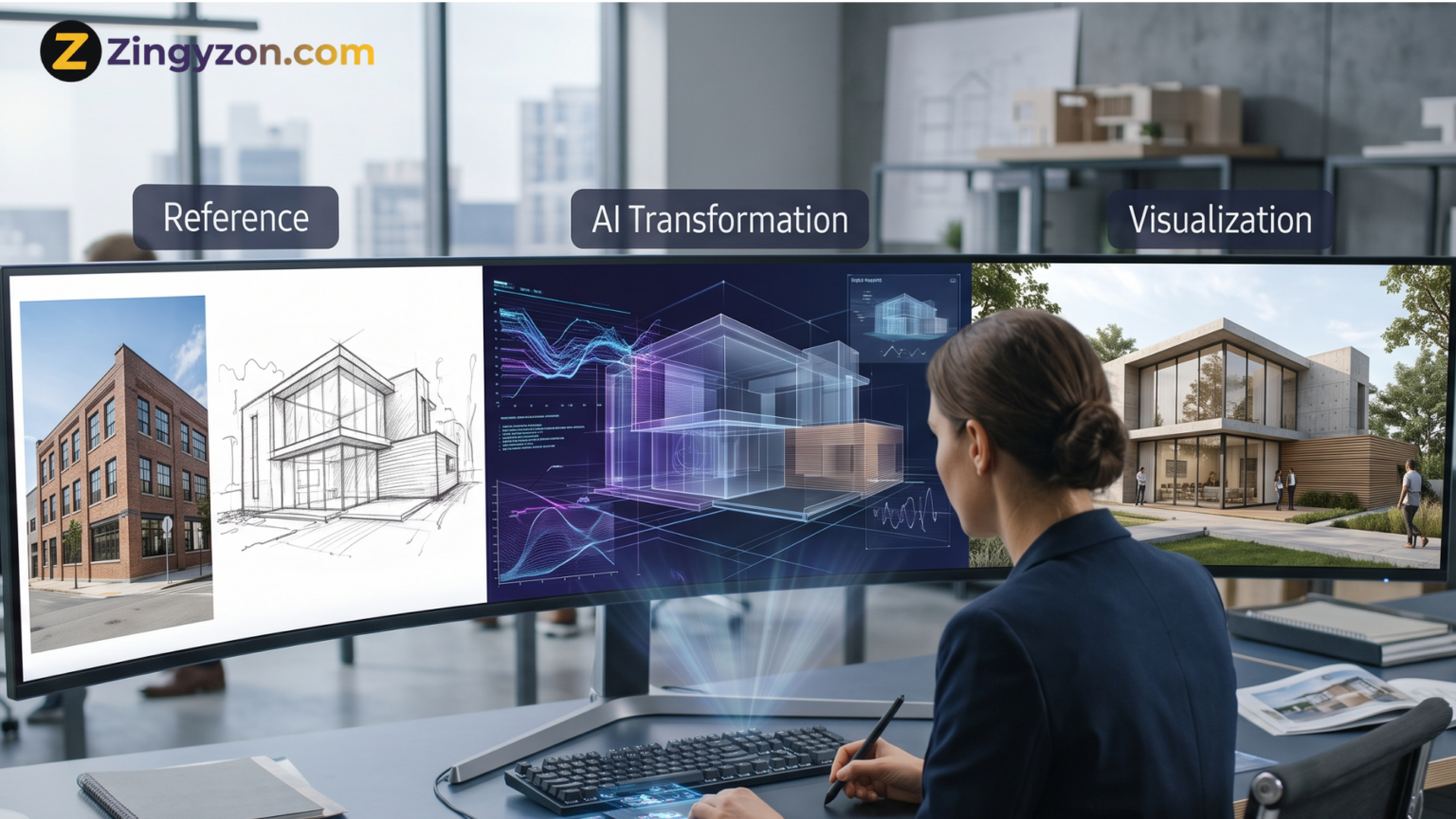
Architectural visualization has always played an important role in turning design ideas into images that clients, investors, and construction teams can understand. In the past, creating realistic architectural visuals required detailed 3D modeling, manual texturing, careful lighting, and long rendering times. Each revision could require hours or even days of additional work.
Artificial intelligence is now changing this process.
Modern AI tools can study reference images, sketches, mood boards, floor plans, and basic 3D models to produce detailed architectural concepts. Designers can explore building styles, materials, lighting conditions, interior layouts, and landscaping ideas without developing every element manually from the beginning.
This does not mean traditional architectural skills are becoming unnecessary. Instead, AI architectural visualization is giving architects and designers a faster way to explore, communicate, and improve ideas before moving into technical design and construction documentation.
From converting a single reference image into an early 3D concept to generating multiple design directions from a basic massing model, AI is reshaping how architectural ideas move from imagination to presentation.
What Is AI Architectural Visualization?
AI architectural visualization is the use of artificial intelligence to create, enhance, or transform visual representations of buildings and spaces.
These visuals may include:
- Exterior building concepts
- Interior design previews
- Landscape designs
- Urban planning scenes
- Renovation ideas
- Material studies
- Day and night variations
- Conceptual 3D models
- Photorealistic property renders
Traditional architectural visualization normally begins with a manually created 3D model. A visualization artist then adds materials, furniture, lighting, vegetation, and environmental details before producing the final render.
AI introduces a more flexible starting point. A designer may begin with a photograph, hand-drawn sketch, screenshot, floor plan, or rough 3D shape. The AI system examines the input and generates a more detailed visual interpretation.
This makes the early visualization process faster and more accessible, especially when the goal is to test an idea rather than create a construction-ready model.
How Reference Images Are Used in Architectural Design
Reference images have always been part of the architectural process. Architects collect photographs of buildings, materials, furniture, landscapes, and interior spaces to communicate a desired visual direction.
Before AI, these references mainly served as inspiration. A visualization artist still had to rebuild the idea manually inside 3D software.
AI can now use reference images more actively.
For example, an architect can upload a photograph of a modern villa and ask an AI tool to create a similar visual language for a commercial building. The system may identify elements such as large windows, concrete surfaces, wooden panels, deep roof overhangs, and surrounding vegetation.
The resulting image is not an exact copy. It is a new concept influenced by the visual characteristics of the reference.
Reference images can also guide:
- Architectural style
- Material selection
- Color palette
- Lighting atmosphere
- Camera angle
- Landscape design
- Interior decoration
- Building proportions
This allows designers to communicate complex visual preferences without describing every detail through text.
From a Flat Image to a 3D Concept
One of the most important developments in this field is the ability to transform two-dimensional information into three-dimensional ideas.
An architect may have a front elevation, a photograph of an existing building, or a hand-drawn perspective. AI can analyze visible shapes, surfaces, and depth clues to estimate how the design might look as a three-dimensional object.
The image to 3D process may generate a basic mesh, depth map, textured asset, or rotatable concept model depending on the tool being used.
This can be helpful during the early design stage because the architect does not have to model every wall, opening, column, or decorative feature before testing the idea.
However, an AI-generated 3D concept should not automatically be treated as an accurate architectural model. A single image does not show hidden dimensions, structural details, exact measurements, or the back of a building. AI estimates these missing elements based on learned patterns.
The result is useful for exploration, but it still needs professional review and manual correction.
How AI 3D Generators Support Architects
Modern AI 3D generators can create basic three-dimensional assets from images, sketches, or written prompts. These assets may include furniture, decorative objects, landscape elements, façade details, or complete conceptual structures.
For architectural visualization teams, this can reduce the time spent creating background assets from scratch.
Imagine an interior designer preparing a hotel lobby concept. Instead of manually modeling every chair, table, lamp, plant pot, and decorative object, the designer may use AI to generate selected elements and then refine them inside traditional 3D software.
The same approach can support exterior scenes. AI-generated trees, benches, sculptures, street furniture, and simple surrounding buildings can help create a complete visual environment more quickly.
The main value is not always the final quality of the generated model. The value is speed during experimentation.
Designers can produce several options, compare them, keep the strongest elements, and remove the rest.
Faster Concept Development
The earliest stage of an architectural project often involves uncertainty. Clients may know that they want a modern home, luxury office, sustainable resort, or attractive retail space, but they may not know exactly how it should look.
Creating a complete 3D model for every possible direction is time-consuming.
AI architectural visualization allows architects to generate several early concepts before committing to one design language. A basic sketch can be transformed into different visual styles, such as minimalist, industrial, classical, tropical, futuristic, or Scandinavian.
The architect can then discuss these options with the client and identify a preferred direction.
This improves the decision-making process because clients can respond to visible ideas rather than abstract descriptions.
Once the design direction is approved, the architectural team can invest more time in accurate modeling, planning, and documentation.
Rapid Material and Façade Exploration
Choosing exterior materials can significantly change the appearance of a building. Brick, stone, glass, timber, metal, concrete, and plaster each create a different character.
Traditionally, testing materials required changing texture maps, adjusting reflections, modifying lighting, and rendering the scene again.
AI can generate visual variations much faster.
A designer can use the same building composition and request versions with:
- A timber and stone façade
- Dark metal cladding
- Exposed concrete
- Red brick
- White plaster
- Large glass panels
- Green walls and planted balconies
These images help architects compare design directions before selecting materials for the detailed model.
Interior designers can use a similar process to test flooring, wall finishes, furniture fabrics, cabinetry colors, and lighting styles.
The generated images may not represent the exact technical properties of a material, but they can provide a strong visual starting point.
Better Communication With Clients
Many clients find it difficult to understand technical drawings. Floor plans, elevations, and sections contain important information, but they do not always communicate the emotional experience of a space.
A realistic visualization can show how natural light enters a room, how materials work together, and how people may use the environment.
AI makes it easier to produce these visuals earlier in the project.
An architect can show a client several versions of a living room, building entrance, office reception area, or outdoor courtyard. The client can identify what they like and dislike before major design decisions are finalized.
This may reduce misunderstandings and help the architect gather clearer feedback.
It can also make presentations more engaging. Instead of showing only technical drawings, the architect can create a visual story that takes the client through the building from different perspectives.
Renovation and Property Transformation
AI architectural visualization is especially useful for renovation projects.
A designer can begin with a photograph of an existing property and generate concepts showing possible improvements. These may include a new façade, updated windows, modern landscaping, an additional floor, a redesigned entrance, or different exterior materials.
For interior renovation, AI can help visualize how an outdated kitchen, bathroom, bedroom, or office might look after improvement.
This approach is valuable for:
- Homeowners
- Interior designers
- Property developers
- Real estate agents
- Renovation companies
- Hospitality businesses
The existing photograph provides visual context, while AI creates a possible future version of the same space.
However, the final renovation plan must still be checked against measurements, budgets, building regulations, planning restrictions, and structural limitations.
AI-Generated Environments and Landscaping
Architectural visualization is not limited to the building itself. The environment around a structure has a major effect on the final presentation.
AI can add trees, gardens, pathways, outdoor furniture, people, vehicles, water features, and background buildings to a basic architectural scene.
It can also create different environmental conditions.
The same project can be visualized during sunrise, sunset, rain, winter, summer, or nighttime. Designers can study how the atmosphere changes the way the building is perceived.
A residential development may appear warm and welcoming during a golden sunset. A commercial tower may look more impressive in a nighttime city scene. A mountain resort may require snow-covered surroundings to communicate its location and purpose.
These variations help architects choose the most suitable presentation style for each project.
Combining AI With Traditional 3D Software
The strongest architectural visualization workflow is often a combination of AI and traditional tools.
AI is useful for speed, inspiration, and visual experimentation. Traditional 3D and building design software provide control, accuracy, and technical reliability.
A practical workflow may begin with a rough model created in architectural software. The model establishes the correct building shape, camera position, floor levels, and major openings.
The designer can then use AI to explore materials, landscaping, weather, furniture, and visual atmosphere.
After selecting the preferred concept, the visualization artist can return to the 3D model and recreate important details accurately.
This combined approach provides the creativity of AI without losing the control required for professional architectural work.
Architects can explore related design and technology insights through zingyzon.com, where complex digital topics are explained in a clear and practical way.
Limitations of AI Architectural Visualization
AI-generated architectural images can look impressive, but they are not always accurate.
Common problems include:
- Inconsistent windows and doors
- Impossible structural elements
- Incorrect reflections
- Furniture with unusual proportions
- Stairs that lead nowhere
- Repeated landscape features
- Unclear building geometry
- Different details across multiple views
- Materials that would be difficult to construct
- Designs that ignore local regulations
AI focuses heavily on visual appearance. It does not automatically understand every engineering, structural, legal, or construction requirement.
A generated image may show a dramatic floating roof, but the system may not explain how that roof will be supported. It may create a glass façade without considering heat control, privacy, or maintenance.
For this reason, AI visualizations should be presented as concepts unless they have been developed from an accurate technical model.
Copyright, Ownership, and Design Responsibility
Architects must also think carefully about the reference images used in AI workflows.
A reference should inspire a direction rather than encourage direct copying of another architect’s protected design. Firms should use images they own, licensed materials, approved client assets, or references that are suitable for their intended use.
The architectural team must also take responsibility for the final design.
AI can suggest forms, materials, and layouts, but it cannot replace professional judgment. Architects still need to evaluate safety, accessibility, sustainability, local regulations, structural feasibility, and user needs.
Human review becomes even more important when AI makes visual experimentation easier.
Will AI Replace Architectural Visualization Artists?
AI is more likely to change the role of visualization artists than remove it.
Professionals who only perform repetitive production tasks may see parts of their workflow automated. However, high-quality architectural visualization requires much more than pressing a generate button.
Visualization artists understand composition, storytelling, materials, lighting, scale, and architectural intent. They know which details should be emphasized and how to create a visual that supports the goals of a project.
AI may produce many images, but a skilled professional must decide which image communicates the right message.
The future visualization artist may spend less time building minor background objects and more time directing concepts, refining results, maintaining consistency, and creating complete visual experiences.
The Future of Architectural Visualization
The future of AI architectural visualization will likely involve deeper connections between images, 3D models, building information, and real-time environments.
Designers may be able to move more easily between a sketch, a generated image, an editable model, and an immersive presentation. Clients may explore several design variations inside interactive virtual spaces rather than viewing only static renders.
AI may also help maintain consistency across different camera angles, automatically update visualizations when a design changes, and generate project-specific materials or furniture.
However, professional standards will remain essential. The best results will come from teams that use AI as a creative assistant while keeping architects, engineers, and visualization specialists in control.
Conclusion
AI is transforming architectural visualization by shortening the distance between an early idea and a clear visual concept.
Reference photographs, sketches, mood boards, and simple models can now become starting points for detailed images and early 3D assets. Architects can test materials, environments, façade styles, lighting conditions, and interior directions before investing time in complete production models.
The technology offers speed and creative freedom, but it also has limits. AI-generated concepts may contain inaccurate geometry, unrealistic construction details, and visual inconsistencies. Professional review is therefore necessary at every important stage.
The most effective approach is not to replace traditional architectural methods. It is to combine AI exploration with accurate modeling, technical knowledge, and human design judgment.
As these tools improve, architectural visualization will become faster, more interactive, and more flexible. Architects who learn how to guide AI responsibly will be able to communicate ideas more clearly while spending more time on the decisions that truly shape a building.
Frequently Asked Questions
What is AI architectural visualization?
AI architectural visualization uses artificial intelligence to generate, improve, or transform images and 3D concepts of buildings, interiors, landscapes, and planned spaces.
Can AI create a 3D model from one image?
AI can estimate shape and depth from a single image, but hidden areas and exact dimensions may not be accurate. Multiple reference images usually provide better results.
Are AI-generated architectural images construction-ready?
No. Most AI-generated images are conceptual. Construction requires accurate drawings, dimensions, engineering information, specifications, and regulatory approval.
How can architects use AI during the design process?
Architects can use AI for concept exploration, style testing, material variations, renovation previews, landscaping ideas, client presentations, and early visual communication.
Does AI replace professional 3D modeling?
AI can automate or speed up parts of the process, but professional modeling is still necessary when accuracy, consistency, and technical control are required.
What is the biggest benefit of AI in architectural visualization?
The biggest benefit is the ability to generate and compare visual ideas quickly before spending significant time developing a complete architectural model.


Keep Exploring Zingyzon.com
Read more Zingyzon SEO, digital marketing, online earning, business, and technology guides for Australia, USA, and global readers.