
EzMaker Image to Image: Reimagining Visual Intelligence in the Age of Generative AI
The way we create and edit images is undergoing a major transformation. Traditional image editing once required expensive software, technical […]
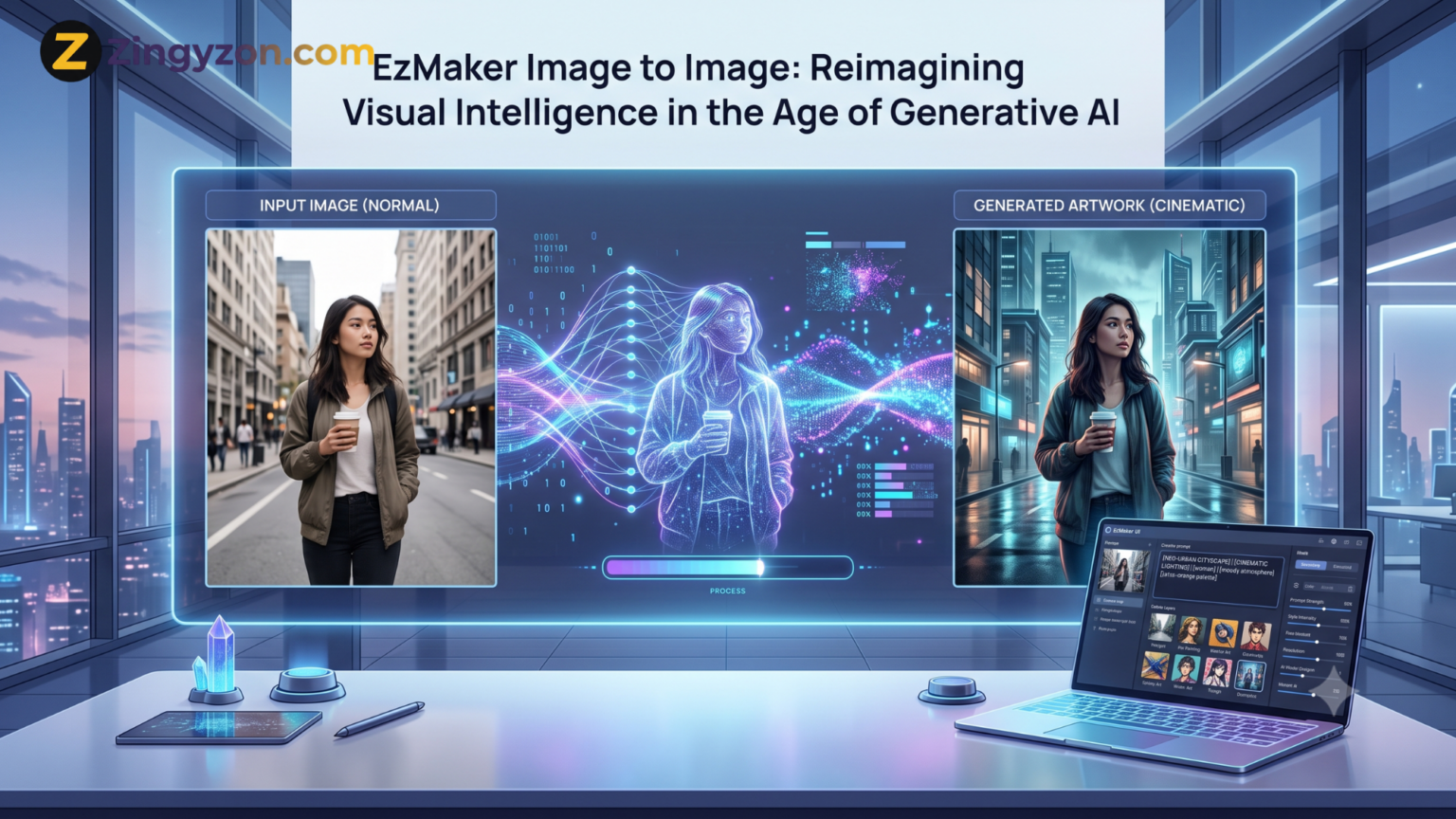
The way we create and edit images is undergoing a major transformation. Traditional image editing once required expensive software, technical knowledge, and hours of manual work. Generative AI has changed that process by allowing users to modify visuals through ordinary written instructions.
EzMaker Image to Image represents this new approach to visual creation. Instead of starting with a blank canvas, users can upload an existing photograph, illustration, sketch, or product image and guide the AI toward a new result.
A basic photo can become a polished marketing visual. A rough sketch can be developed into a detailed concept. A simple room photograph can be reimagined with a different interior style. The original image provides visual structure, while the text prompt tells the AI what should change.
This combination of visual understanding and natural-language control makes image-to-image technology valuable for designers, marketers, online sellers, content creators, students, and everyday users.
What Is EzMaker Image to Image?
EzMaker Image to Image is an online generative AI tool that transforms an existing image according to a user’s written instructions. The uploaded picture acts as a visual reference, while the prompt describes the desired style, background, mood, object, color scheme, or overall transformation.
Unlike a basic filter that applies the same preset effect to every photograph, an image-to-image system analyzes the content of the uploaded visual. It identifies subjects, objects, colors, shapes, lighting, composition, and spatial relationships before generating a modified version.
For example, a user may upload a portrait and ask the tool to:
- Change the background to a professional office
- Convert the portrait into anime artwork
- Improve the lighting and color balance
- Add a cinematic atmosphere
- Replace the subject’s clothing
- Turn the photograph into a watercolor painting
The official EzMaker platform describes its image-to-image feature as a tool for editing, restyling, and recreating uploaded images through simple text prompts. It also supports both single-image and multiple-image references.
Users can access the official Free Image to Image tool directly through a web browser without installing traditional design software.
How Image-to-Image AI Works
Image-to-image AI combines computer vision with generative models. Computer vision helps the system understand what is present in the source image, while generative AI creates a new version based on the prompt.
Although the technical process is complex, the user experience is relatively simple.
1. The Original Image Provides Structure
The uploaded image gives the AI information about the subject, composition, proportions, pose, colors, perspective, and background.
For instance, when a user uploads a photograph of a person standing beside a car, the system can recognize the person, vehicle, road, lighting, and general arrangement of the scene.
2. The Prompt Defines the Transformation
The user then describes what should happen. A prompt could say:
“Turn this photograph into a cinematic night scene with neon city lights, realistic reflections, and dramatic blue lighting.”
The AI uses these instructions to determine which visual characteristics should change and which should remain recognizable.
3. Generative AI Produces a New Image
The system generates a new visual that combines the source image’s structural information with the user’s requested changes.
A well-written prompt may preserve the main subject while changing the style, environment, color palette, or atmosphere. Results can vary, so users may need to adjust their prompts and generate more than one version.
From Image Editing to Visual Intelligence
The importance of EzMaker Image to Image goes beyond quick photo editing. It reflects a wider shift toward visual intelligence.
Visual intelligence refers to a machine’s ability to interpret, understand, modify, and generate visual information. Earlier editing tools followed direct commands. A user selected an area, chose a tool, adjusted settings, and manually performed each change.
Generative AI works differently. It attempts to understand the intention behind the request.
When a user asks for a “warm, welcoming café interior,” the system must interpret several related ideas. It may add softer lighting, wooden textures, comfortable furniture, warm colors, and decorative elements that match the requested atmosphere.
This ability to translate language into visual decisions makes modern AI tools feel less like basic software and more like creative assistants.
The user still provides direction, reviews results, and makes final decisions. However, the AI handles much of the technical production work that previously required advanced editing experience.
Main Features of EzMaker Image to Image
EzMaker Image to Image is designed to support several types of visual transformation.
Prompt-Based Image Editing
Users can describe the changes they want in natural language. A prompt may request a new background, different clothing, improved lighting, additional objects, or a new artistic style.
This method reduces the need to learn complex menus, layers, masking tools, and manual selection techniques.
Image Restyling
A photograph can be transformed into different artistic styles, including:
- Cartoon artwork
- Anime illustration
- Pixel art
- Watercolor painting
- Oil-painting style
- Cinematic photography
- Fantasy artwork
- Minimalist illustration
EzMaker states that its tool attempts to preserve the main subject while changing the overall visual style. However, users should still review facial details, hands, text, and product shapes because generative models can occasionally alter important features.
Background Replacement
The tool can reimagine the environment surrounding the subject. A basic product photograph may be placed in a luxury studio, natural outdoor setting, modern kitchen, or seasonal advertising scene.
This can be particularly useful for businesses that need multiple marketing visuals but do not have the budget for repeated professional photo shoots.
Object Addition and Removal
Prompt-based editing can be used to remove distracting elements or add new items to a scene.
For example, users may request:
- Remove people from the background
- Add decorative plants to a room
- Replace a cloudy sky with a sunset
- Add accessories to a product display
- Remove clutter from a workspace
The accuracy of these edits depends on the complexity and quality of the original image.
Multiple-Image Referencing
EzMaker’s official image-to-image page states that the platform can use single or multiple uploaded images as references. Multiple-image generation allows users to combine ideas, subjects, outfits, or design elements from different visuals.
A fashion seller, for example, may use one image as a model reference and another as a clothing reference to explore a new promotional concept.
Resolution and Aspect-Ratio Controls
Users can adjust output-related settings such as resolution and aspect ratio before generating the final image. This makes it easier to create visuals for different platforms, including:
- Website banners
- Instagram posts
- Pinterest pins
- Product listings
- Blog featured images
- Digital advertisements
- Presentation slides
The official image-to-image page currently states that generated outputs can support resolutions up to 4K.
How to Use EzMaker Image to Image
The basic workflow involves three main stages.
Step 1: Upload a Reference Image
Choose a clear image that represents the subject or composition you want to transform. EzMaker supports common formats such as JPG, JPEG, PNG, and WebP.
Images with clear lighting and visible subjects generally give the AI more useful visual information. Avoid heavily compressed, extremely blurry, or badly cropped images when possible.
Step 2: Write a Detailed Prompt
Explain the desired result clearly. Include the subject, environment, style, lighting, mood, colors, and any elements that must remain unchanged.
A weak prompt might say:
“Make this better.”
A stronger prompt would say:
“Transform this product photo into a premium studio advertisement with a soft beige background, natural shadows, warm lighting, realistic textures, and a clean luxury aesthetic. Keep the product shape and label unchanged.”
The second prompt gives the model far more useful direction.
Step 3: Generate and Review the Result
Select the preferred resolution or aspect ratio and generate the image. Examine the output closely before using it.
Check the following areas:
- Facial features
- Hands and fingers
- Product labels
- Small text
- Brand logos
- Object proportions
- Background details
- Shadows and reflections
When the result is not suitable, revise the prompt and generate another version. Image-to-image creation is often an iterative process rather than a one-click solution.
Practical Uses of EzMaker Image to Image
E-Commerce Product Photography
Online sellers can transform simple product photographs into more attractive listing images. Backgrounds can be cleaned, replaced, or adapted for different seasons and campaigns.
A plain photograph of a coffee mug could be reimagined in a modern kitchen, on an office desk, or beside a gift box.
AI-generated scenes should still represent the product accurately. Sellers should not use visual modifications that mislead customers about size, color, materials, or included accessories.
Social Media Content
Content creators often need multiple visuals for different posts and platforms. EzMaker can turn one source image into several stylistic variations.
A travel photograph could become a cinematic poster, illustrated postcard, Instagram Story background, or vibrant social advertisement.
Interior Design Concepts
Interior designers and homeowners can use image-to-image AI to explore early-stage ideas. A room photograph can be transformed into modern, industrial, Scandinavian, traditional, or minimalist styles.
These visuals are best treated as creative concepts rather than exact construction plans. AI may not accurately represent dimensions, building codes, structural requirements, or installation costs.
Marketing and Advertising
Small businesses can create campaign concepts without arranging a complete photo shoot for every idea.
A single product image may be adapted for:
- Holiday promotions
- Summer campaigns
- Luxury advertisements
- Social media announcements
- Website hero sections
- Email marketing graphics
The tool can speed up concept development, although important commercial artwork should still receive human review.
Character and Artwork Development
Illustrators can upload sketches and use AI to explore colors, clothing, settings, lighting, and rendering styles.
The generated image can serve as inspiration or an early concept. Artists can then refine the idea manually and add their own creative decisions.
Personal Photo Transformation
Everyday users can restyle portraits, pet photographs, landscapes, and travel images. They may create fantasy artwork, professional-looking profile pictures, greeting cards, or personalized gifts.
How to Write Better Image-to-Image Prompts
A strong prompt should explain both what needs to change and what needs to remain consistent.
A useful structure is:
Subject + requested change + style + environment + lighting + colors + details to preserve
For example:
“Turn this daytime street photograph into a realistic rainy-night scene with warm shop lights, reflections on the road, cinematic contrast, and subtle mist. Preserve the buildings, camera angle, and main subject.”
Use specific visual language instead of vague phrases. Words such as soft lighting, shallow depth of field, realistic texture, minimalist composition, symmetrical framing, and warm color palette give the model clearer direction.
When preserving identity or product accuracy matters, state it directly:
- Keep the face recognizable
- Preserve the original product shape
- Do not alter the logo
- Maintain the same pose
- Keep the camera angle unchanged
- Retain the original room layout
Even with detailed prompts, exact preservation is not guaranteed. Always compare the generated result with the source image.
Benefits of Using EzMaker AI
The main benefit of EzMaker AI is accessibility. Users can experiment with AI-assisted editing through a browser instead of purchasing complex professional software.
Other potential benefits include:
- Faster creative experimentation
- No traditional editing experience required
- Multiple visual variations from one image
- Useful outputs for marketing and social media
- Support for common image formats
- Prompt-based controls
- Single and multiple reference images
- Mobile-browser compatibility
According to its current website, EzMaker also offers tools for object removal, background editing, image enhancement, expansion, and upscaling.
Readers interested in more technology, digital tools, and practical online guides can explore Zingyzon for additional educational content.
Limitations to Consider
Generative AI is powerful, but it is not completely predictable.
The system may change details that the user wanted to preserve. Faces can become slightly different, products may lose accurate proportions, and written text can become unreadable.
Other limitations may include:
- Inconsistent results between generations
- Difficulty preserving small details
- Distorted hands or facial features
- Incorrect text and logos
- Unrealistic shadows or reflections
- Dependence on prompt quality
- Possible bias in generated results
- Limited control compared with manual professional editing
For important brand campaigns, product listings, legal documents, or client projects, human review remains essential.
Privacy, Copyright, and Responsible Use
Users should only upload images they own or have permission to use. Copyrighted artwork, private photographs, celebrity images, and protected brand assets may create legal or ethical concerns.
EzMaker’s official website states that generated images may be used commercially, provided the originally uploaded material does not violate copyright. Users should still check the platform’s latest terms before using outputs in paid campaigns, merchandise, or client work.
The platform also states that uploaded data is deleted within 24 hours and is not used for third-party training. Because privacy terms can change, users handling confidential, personal, or commercially sensitive images should review the latest privacy policy before uploading them.
Responsible use also means avoiding deceptive transformations. AI-generated images should not be used to impersonate people, spread false information, create non-consensual content, or misrepresent products.
The Future of Visual Creation
Image-to-image technology is likely to become a normal part of creative workflows. Instead of replacing every designer, photographer, or illustrator, it may change how these professionals develop and test ideas.
Creators can spend less time on repetitive preparation and more time on direction, storytelling, quality control, and original concepts.
Future tools may offer stronger identity preservation, more accurate text generation, improved product consistency, better editing controls, and closer integration with conventional design software.
The most valuable skill may no longer be knowing every technical editing command. It may be the ability to communicate a clear visual intention, evaluate AI output critically, and refine an idea until it meets a professional standard.
Frequently Asked Questions
What is EzMaker Image to Image?
EzMaker Image to Image is an online generative AI tool that uses uploaded images and written prompts to create modified, restyled, or reconstructed visuals.
Is EzMaker Image to Image free?
The official EzMaker website currently describes the image-to-image feature as free and available without hidden fees. Users should check the website for the latest usage conditions.
Do I need to install software?
No. The tool works through a web browser, so traditional desktop software installation is not required.
What images can I upload?
EzMaker supports common image formats such as JPG, JPEG, PNG, and WebP. Users can upload photographs, selfies, landscapes, sketches, pet images, and product visuals.
Can I use multiple reference images?
Yes. EzMaker states that its image-to-image tool supports both single-image and multiple-image references.
Can the generated images be used commercially?
EzMaker states that commercial use is permitted, provided the source images do not violate copyright. Review the latest terms before using an image in a commercial project.
Will the AI preserve the original subject?
The tool attempts to maintain the main subject while applying requested changes. However, generative AI can alter faces, shapes, text, logos, and small details, so every output should be reviewed.
What resolution does EzMaker support?
The official image-to-image page currently states that it supports image output up to 4K resolution.
Final Thoughts
EzMaker Image to Image demonstrates how generative AI is transforming visual editing from a technical process into a conversational one. Users no longer need to manually control every layer, mask, effect, and adjustment. They can upload an image, describe their idea, and generate a new visual direction within seconds.
Its value lies in speed, accessibility, and creative experimentation. E-commerce sellers can improve product presentations, marketers can develop campaign concepts, designers can test styles, and everyday users can transform personal photographs.
However, AI-generated visuals still require careful review. Accuracy, copyright, privacy, product honesty, and responsible use remain important.
EzMaker Image to Image is not simply another photo filter. It represents a broader change in how people communicate with creative technology—using images as references, language as direction, and AI as a tool for exploring new visual possibilities.
Keep Exploring Zingyzon.com
Read more Zingyzon SEO, digital marketing, online earning, business, and technology guides for Australia, USA, and global readers.