
Why Every Remote Worker Needs a Portable Screen Extender in Their Bag
Remote work gives you the freedom to work from home, a coffee shop, a coworking space, a hotel, or even […]
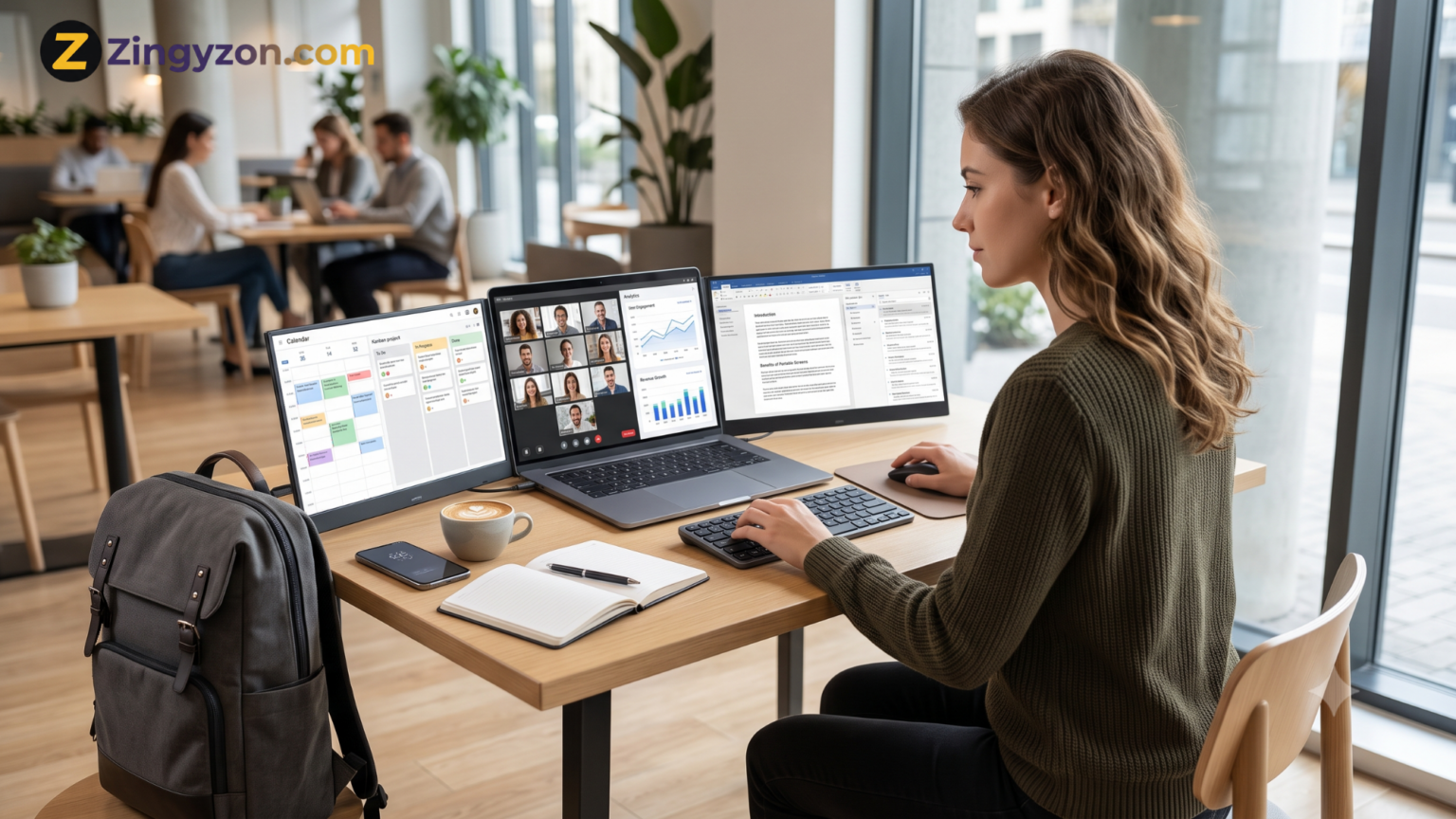
Remote work gives you the freedom to work from home, a coffee shop, a coworking space, a hotel, or even an airport lounge. However, that flexibility often comes with one frustrating limitation: working on a single laptop screen.
A small laptop display may be enough for checking emails or completing a quick task, but it becomes restrictive when you need to compare documents, attend a video meeting, manage a project, analyze data, edit content, or communicate with your team at the same time.
A portable screen extender solves this problem by giving you additional screen space without forcing you to carry a full-size desktop monitor. It turns an ordinary laptop into a more capable mobile workstation that can be used almost anywhere.
For remote workers who regularly move between locations, a portable monitor is no longer simply an optional accessory. It can become one of the most practical productivity tools in their work bag.
What Is a Portable Screen Extender?
A portable screen extender is a lightweight external display designed to connect to a laptop. Depending on the model, it may attach directly to the laptop, stand beside it, or unfold into a multi-screen arrangement.
Most modern screen extenders connect through USB-C, USB-A, HDMI, or a combination of these ports. Once connected, the additional display can mirror the laptop screen or extend the desktop, allowing different applications to appear on separate screens.
For example, you could keep a video conference open on one display while taking notes on another. A writer could research on one screen and draft an article on the other. A digital marketer could monitor analytics while editing a campaign.
Unlike a traditional desktop monitor, a portable screen extender is designed for mobility. It can usually be folded, packed, carried, and set up within minutes.
Why a Single Laptop Screen Can Limit Remote Work
Laptop screens are designed to balance portability, battery life, and usability. Although modern laptops offer impressive display quality, the available workspace is still limited.
Remote workers often have several tools open at once, including:
- Project management software
- Team communication apps
- Web browsers
- Video-conferencing platforms
- Spreadsheets
- Documents
- Design or editing software
On one screen, these applications compete for space. You may have to minimize one window, open another, return to the first application, and repeat the process throughout the day.
This constant switching may appear harmless, but it interrupts concentration. Every time you search for a hidden window or reopen a reference document, part of your attention moves away from the main task.
A portable screen extender allows you to keep important information visible instead of repeatedly switching between tabs and applications.
1. It Creates a Productive Workspace Anywhere
One of the biggest challenges of remote work is maintaining the same level of productivity in different locations.
Your home office may include a large monitor, keyboard, mouse, and comfortable desk. However, the setup changes when you work from a hotel, shared office, café, library, or client location.
A portable screen extender helps create a familiar working environment wherever you open your laptop. Instead of adjusting to a restricted single-screen setup, you can recreate part of your normal workstation in a few minutes.
This consistency can be especially valuable for digital nomads, freelancers, consultants, sales professionals, and employees who travel frequently.
Whether you are preparing a client presentation from a hotel room or completing a report at a coworking desk, extra display space helps the temporary location feel more like a proper office.
2. It Makes Multitasking More Manageable
Multitasking is common in remote work, even when you are focused on one main project.
For example, a content writer may need to view a brief, keyword list, reference article, and writing document. A developer may need a code editor, browser preview, documentation, and communication app. An accountant may compare invoices with spreadsheets and financial software.
With only one display, each task requires repeated window switching. With a portable screen extender, you can assign different applications to different screens.
You might use:
- The main laptop screen for your primary task
- A second screen for research or supporting documents
- A third screen for messages, email, or meetings
This arrangement does not mean you have to work on everything simultaneously. Instead, it keeps the tools needed for one task visible and organized.
3. It Can Improve Video Meetings
Video calls are an essential part of remote work, but they can become difficult when everything must fit on one laptop screen.
During a meeting, you may need to view participants, follow a presentation, read an agenda, take notes, and check a related document. Placing everything on one display can make text difficult to read and important information easy to miss.
An additional screen provides a cleaner meeting setup. You can keep the video call on one display and use another for notes, documents, or presentation controls.
This setup is particularly helpful for:
- Remote team meetings
- Client consultations
- Online training sessions
- Sales presentations
- Interviews
- Virtual workshops
It also reduces the need to minimize the meeting window whenever you need to check information.
4. It Helps Remote Workers Stay Organized
A cluttered digital workspace can become as distracting as a cluttered physical desk.
When many windows are stacked on a single screen, it becomes harder to remember where everything is located. You may accidentally close an important document, respond to the wrong conversation, or lose track of a reference page.
A portable screen extender allows you to create a more organized layout.
For example, you could dedicate one screen to communication and another to focused work. Alternatively, you could place your calendar and task list on the secondary display while keeping the primary screen clear.
This visual separation can make the workday feel more structured. Instead of searching through overlapping windows, you know where each type of information is located.
5. It Supports Creative and Technical Work
Some jobs benefit from additional screen space more than others.
Graphic designers can keep design software open while viewing references, client instructions, or asset folders. Video editors can use one screen for the editing timeline and another for previews or media files.
Developers can display code on one screen and test the result on another. SEO specialists can compare keyword research, search results, analytics, and content drafts without constantly changing tabs.
A portable screen extender is also useful for:
- Website designers
- Social media managers
- Data analysts
- Online teachers
- Financial professionals
- Virtual assistants
- Researchers
- Customer support teams
The value comes from being able to view related information together rather than opening each item separately.
6. It Is More Travel-Friendly Than a Desktop Monitor
A standard desktop monitor offers excellent screen space, but it is not designed to travel. It requires additional packaging, power cables, protection, and desk space.
A portable monitor is built for people who need flexibility. Many models are slim enough to fit inside a laptop bag or backpack alongside other work accessories.
Products such as the Mobile Pixels Trio demonstrate how a laptop can be expanded into a multi-screen workstation without relying on permanent desktop equipment. The current Trio 3 Pro, for example, uses two 14.1-inch QHD displays and supports USB-C connectivity, an integrated kickstand, and Windows and macOS systems. exact weight and dimensions vary by model, so remote workers should always compare portability with the amount of screen space they actually need.
7. It Can Reduce Unnecessary Printing
Some remote workers print documents simply because comparing multiple files on one screen is inconvenient.
For example, they may print a report to keep it visible while entering information into a spreadsheet. Others print briefs, checklists, contracts, or reference material because there is not enough room to view everything digitally.
Additional screen space can reduce the need for this temporary printing. A document can remain open on the secondary display while you complete the related work on the main screen.
This may help reduce paper use, printing costs, and the need to carry physical documents while travelling.
8. It Makes Presentations and Collaboration Easier
Portable monitors are not only useful for individual productivity. They can also support collaboration.
Some screen extenders allow the display to rotate or face another person. This can make it easier to show a design, explain a report, review a proposal, or share a presentation with a client sitting across the table.
Instead of turning your entire laptop around, you can adjust the secondary display for easier viewing.
This is helpful for consultants, sales representatives, designers, property professionals, trainers, and anyone who regularly works face-to-face with clients.
9. It Gives You More Control Over Your Workflow
Remote work often involves unexpected changes. You may lose access to your normal office, need to travel at short notice, or spend the day working from a different location.
Keeping a portable screen extender in your bag gives you greater control over these situations. You are not completely dependent on the equipment available at a hotel, client office, or coworking space.
Your essential workstation travels with you.
This can reduce the disruption caused by changing work environments and help you follow a consistent workflow even when your location changes.
How to Choose the Right Portable Screen Extender
Not every portable monitor is suitable for every remote worker. Before buying one, consider how and where you plan to use it.
Check Laptop Compatibility
Start by checking your laptop’s operating system, available ports, display-output capabilities, and supported number of external screens.
A USB-C port does not automatically guarantee video output. Some USB-C ports only support data transfer or charging. Look for DisplayPort Alt Mode or Thunderbolt support when required by the monitor.
MacBook users should also check how many external displays their specific model supports.
Consider the Number of Screens
A single portable monitor is lighter and often easier to carry. A dual-screen extender provides more workspace but may add extra weight and require a larger desk.
Choose according to your actual workflow rather than simply selecting the maximum number of screens.
Compare Screen Size and Resolution
A larger display provides more space, but it also takes up more room in your bag.
Resolution affects text clarity and usable workspace. Full HD may be enough for everyday office work, while designers, editors, and professionals working with detailed visuals may prefer a higher-resolution screen.
Review Weight and Folded Dimensions
A screen extender may be described as portable, but that does not necessarily mean it will feel lightweight during daily travel.
Check the total weight, folded dimensions, required accessories, and whether a protective case is included.
Look at Power Requirements
Some portable monitors draw power directly from the laptop, while others may need an external power source under certain conditions.
Laptop-powered displays are convenient, but they can increase battery consumption. Pass-through charging can be useful when you want to power the laptop and monitor through a compatible setup.
Check the Stand and Mounting Design
A screen should remain stable while typing, adjusting your chair, or moving the desk slightly.
Look for a strong kickstand, secure attachment system, adjustable viewing angles, and a design that does not place unnecessary pressure on the laptop screen.
Tips for Using a Portable Screen Extender Comfortably
Additional screens are useful only when they are arranged comfortably.
Keep the main display directly in front of you and place frequently used secondary information close to your natural viewing direction. Avoid positioning a screen so far to the side that you must repeatedly twist your neck.
Match the brightness of the displays as closely as possible, especially when working in low-light environments. Increasing text size can also make a smaller portable display more comfortable to use.
When working for long periods, take regular breaks, change position, and avoid relying on a low table that forces you to look downward continuously.
A portable laptop stand, compact keyboard, and mouse can create a more comfortable setup when space allows.
Is a Portable Screen Extender Worth It?
A portable screen extender is worth considering when limited screen space regularly slows down your work.
It may be particularly valuable when you:
- Travel frequently
- Work from multiple locations
- Use several applications together
- Attend regular video meetings
- Compare documents or data
- Create, edit, design, or code
- Deliver presentations to clients
- Want a consistent workstation while travelling
However, it may not be necessary if your tasks are simple, you rarely leave your home office, or you already have reliable access to a full-size external monitor.
The best decision depends on your workflow. A portable monitor should solve a genuine working problem rather than simply add another device to your bag.
Frequently Asked Questions
What is the best portable screen extender for remote work?
The best option depends on your laptop, budget, travel habits, preferred screen size, and number of displays. Look for strong compatibility, a stable stand, clear resolution, manageable weight, and suitable connectivity.
Can a portable monitor work with any laptop?
No. Compatibility depends on the laptop’s ports, operating system, graphics capabilities, and support for external displays. Always review the manufacturer’s compatibility information before purchasing.
Does a portable screen extender drain laptop battery?
It can increase battery use when powered directly through the laptop. Battery consumption depends on the number of screens, brightness level, resolution, connection type, and laptop capacity.
Can I carry a screen extender on a flight?
Portable monitors can generally be carried with personal electronic equipment, but airline and security requirements may vary. Store the screen securely in a protective sleeve and confirm current travel rules before flying.
Is one extra screen enough for remote work?
One additional screen is enough for many remote workers. It provides space for reference material, communication tools, meetings, or secondary applications. Professionals with more complex workflows may benefit from two extra displays.
Final Thoughts
Remote work is supposed to provide flexibility, but flexibility should not require sacrificing productivity.
A portable screen extender gives remote workers additional display space without tying them to a permanent desk. It can make multitasking easier, improve video meetings, support creative and technical work, reduce window clutter, and create a more consistent workstation wherever work takes place.
The most important factor is choosing a model that matches your laptop and daily routine. Consider compatibility, weight, screen size, power requirements, stability, and the amount of desk space available.
When selected carefully, a portable screen extender can transform a laptop from a basic travel device into a capable mobile workstation.
For more practical technology, productivity, and remote-working guides, explore zingyzon.com.


Keep Exploring Zingyzon.com
Read more Zingyzon SEO, digital marketing, online earning, business, and technology guides for Australia, USA, and global readers.