
How to Send Offer on Depop: Step-by-Step Guide
If you’re a fan of online shopping and selling, you probably use Depop. But have you ever wondered how to […]
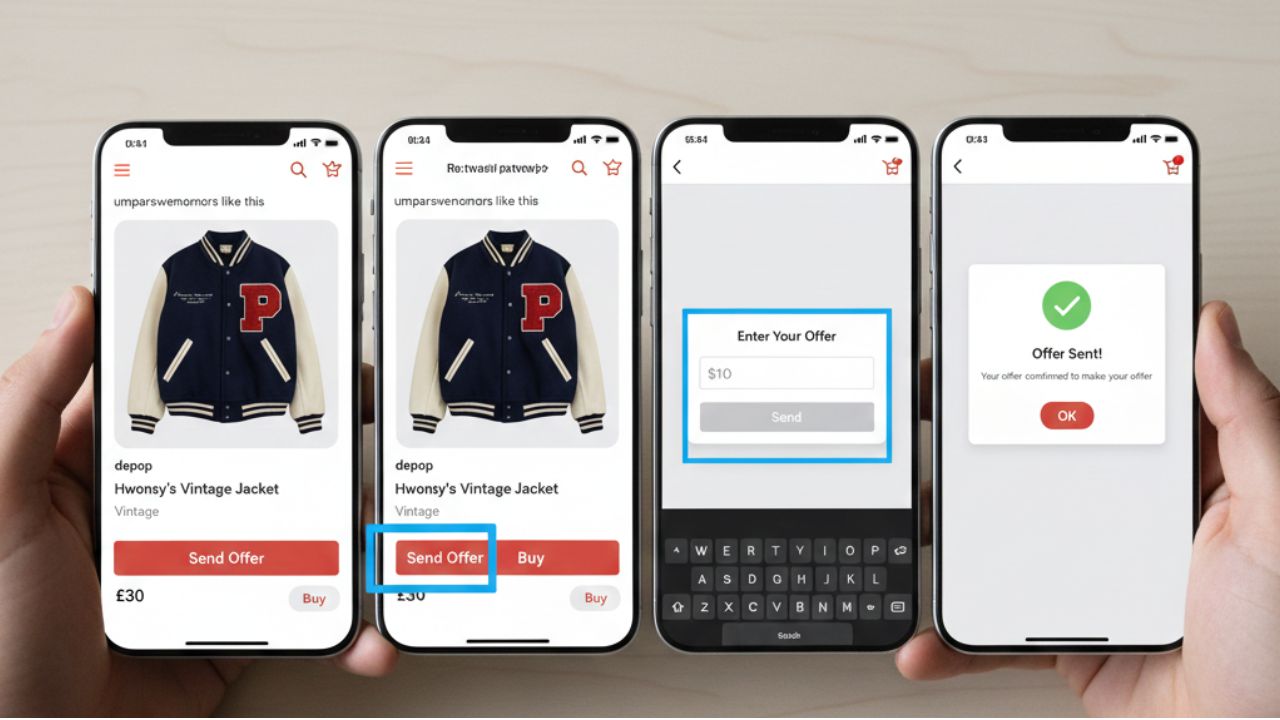
If you’re a fan of online shopping and selling, you probably use Depop. But have you ever wondered how to send offer on Depop? Depop is not just a marketplace for buying and selling unique items; it’s also a platform where you can negotiate prices. Sending an offer allows you to propose a lower price to a seller, making it a great way to save money and get the items you love.
In this guide, we’ll explain step-by-step how to send an offer, tips to make your offer accepted, and how to stay safe while negotiating on Depop.
What Is an Offer on Depop?
An offer on Depop is a price proposal you send to a seller for an item listed at a higher price. Instead of paying the listed price, you can negotiate and see if the seller agrees to sell it at your proposed price. It’s a common feature used to get better deals on clothes, accessories, or vintage items.
Benefits of sending an offer:
- Potential discounts: Buy items for less than the listed price.
- Flexibility: Sellers can accept, decline, or counter your offer.
- Negotiation opportunity: Helps you build a connection with the seller.
Step 1: Open the Depop App
To send an offer, first open the Depop app on your smartphone. You need to be logged in to your account. If you don’t have an account, you’ll need to sign up first using your email, phone number, or social media account.
Step 2: Find the Item You Want
Browse Depop and select the item you want to buy. Make sure the listing shows “Offers Enabled”. Some sellers may not allow offers, so check the item details before attempting to negotiate.
Step 3: Tap on the Offer Button
Once you’re on the item page:
- Look for the “Make Offer” button near the price.
- Tap on it to open the offer screen.
This feature allows you to propose a price lower than the seller’s listed price.
you can also check out our guide : zingyzon.com
Step 4: Enter Your Offer
- Type in the amount you’re willing to pay.
- Be realistic—offering too low may result in rejection.
- Consider adding a polite message explaining why you’re making this offer.
For example:
“Hi! I love this jacket. Would you accept $25 for it? Thank you!”
A friendly message increases the chances of your offer being accepted.
Step 5: Send the Offer
After entering your price and optional message, tap “Send Offer”. The seller will receive a notification and can choose to:
- Accept your offer: You can then proceed to payment immediately.
- Decline the offer: The item stays listed at the original price.
- Counter your offer: They may propose a price in between your offer and the listed price.
Step 6: Wait for the Seller’s Response
After sending the offer, be patient. Sellers may take some time to respond. Depop will notify you once the seller replies. If the offer is accepted, make sure to complete the payment promptly to secure the item.
Tips for Sending Offers on Depop
- Be polite: Always use friendly language in your message.
- Offer reasonable prices: A fair offer is more likely to be accepted.
- Know the item value: Research similar items to gauge a fair price.
- Timing matters: Some sellers are more likely to accept offers on items listed for a long time.
- Negotiate respectfully: If you receive a counteroffer, respond professionally and consider meeting in the middle.
Safety Tips
While Depop is generally safe, always follow these precautions when sending offers:
- Keep transactions on Depop: Avoid paying outside the app to ensure protection.
- Check seller reviews: Look at past ratings to ensure the seller is reliable.
- Communicate clearly: Make sure the item, price, and shipping are agreed upon.
Conclusion
Knowing how to send offer on Depop is a useful skill for anyone looking to shop smart. By following these steps—finding the item, tapping the offer button, entering a reasonable price, and communicating politely—you increase your chances of getting the items you love at a better price.
Offers are not only about saving money; they are also an opportunity to engage with sellers, learn negotiation skills, and enjoy the thrill of finding a deal. With the tips and precautions outlined above, you can confidently send offers and make your Depop shopping experience even better.



Keep Exploring Zingyzon.com
Read more Zingyzon SEO, digital marketing, online earning, business, and technology guides for Australia, USA, and global readers.