
How to Fix Blurry Property Photos with AI
Blurry property photos can instantly reduce the impact of a real estate listing. Whether you are selling a house, renting […]
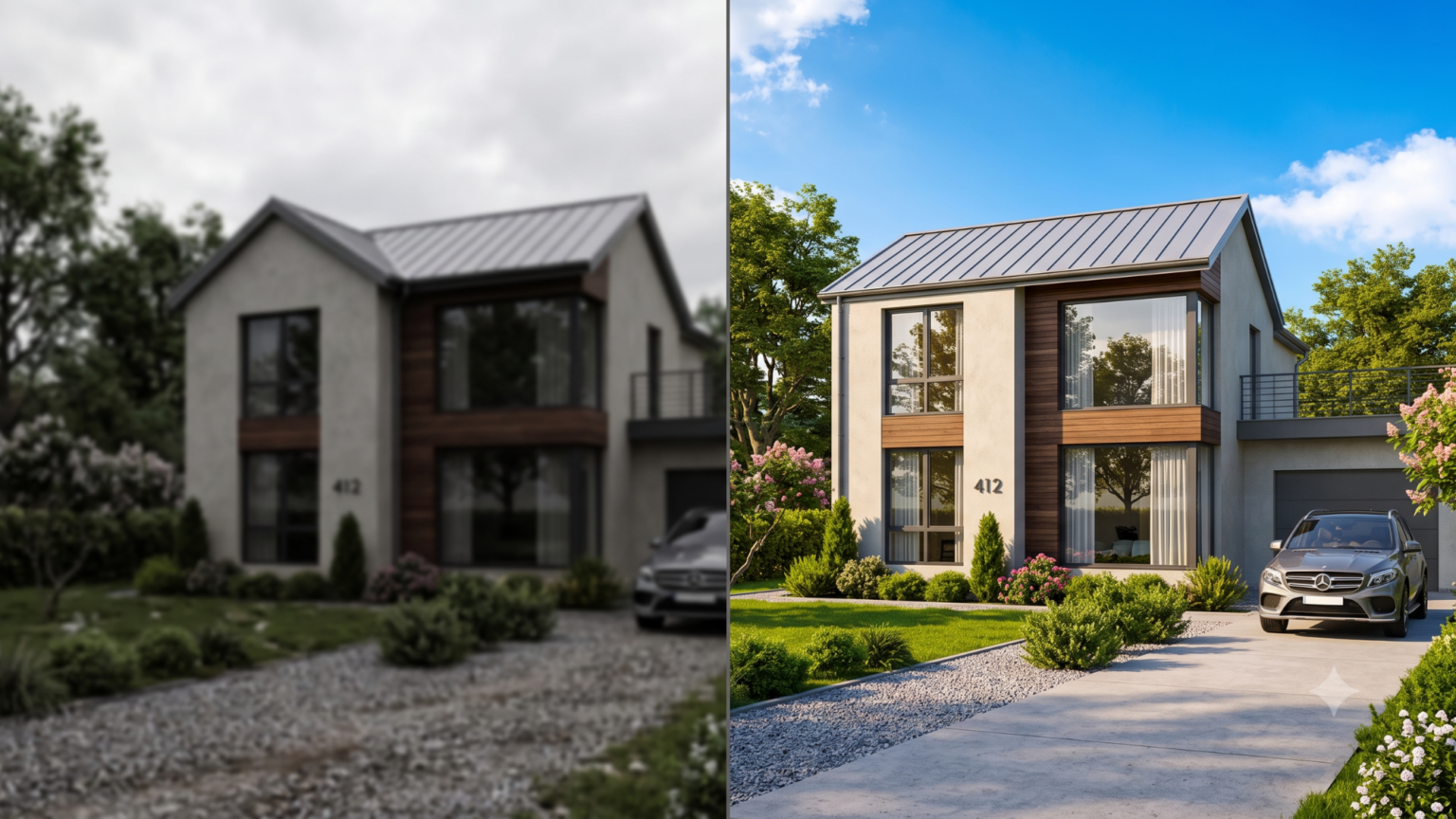
Blurry property photos can instantly reduce the impact of a real estate listing. Whether you are selling a house, renting an apartment, promoting a hotel room, or showcasing commercial property, image quality plays a major role in how people judge the space. A property may be beautiful in real life, but if the photos look unclear, shaky, dull, or low-resolution, buyers and renters may scroll past without showing interest.
The good news is that you no longer need expensive editing software or advanced photography skills to improve blurry images. Today, AI tools can sharpen details, reduce noise, improve lighting, and make property photos look cleaner and more professional within minutes. If you want to fix blurry property photos with AI, this guide will explain everything in a simple and practical way.
AI photo editing has become especially useful for real estate agents, property owners, Airbnb hosts, interior designers, and online listing managers. With the right approach, you can turn unclear property images into sharper, more attractive visuals that help your listings stand out. Platforms like zingyzon.com make it easier for users to explore AI-based tools and improve digital content without needing technical experience.
Why Clear Property Photos Matter
Property photos are often the first thing people notice in a listing. Before reading the description, checking the price, or looking at the location, most users judge a property by its images. If the pictures look sharp, bright, and professional, the property feels more trustworthy and valuable. If the images are blurry or poorly edited, the listing may look careless or outdated.
Clear photos help viewers understand the layout, size, design, and condition of a property. They can see room details, flooring, windows, kitchen fittings, bathroom quality, garden space, and exterior features more clearly. This builds confidence and encourages people to take the next step, such as contacting the agent, booking a visit, or saving the listing.
Blurry photos, on the other hand, create confusion. Viewers may wonder if the seller is hiding defects or if the property is not worth their attention. In competitive real estate markets, even a small improvement in image quality can make a major difference.
Common Reasons Property Photos Become Blurry
Before learning how to fix blurry property photos with AI, it is helpful to understand why photos become blurry in the first place. One common reason is camera shake. This happens when the camera or phone moves while taking the picture. Indoor property photos are especially affected because low light can force the camera to use slower shutter speeds.
Another reason is poor focus. Sometimes the camera focuses on the wrong object, such as a wall, window, or furniture item, instead of the main room area. Low-resolution images can also appear blurry, especially when they are uploaded to websites or stretched to larger sizes.
Bad lighting is another major issue. Dark rooms, strong sunlight through windows, or uneven lighting can reduce clarity. When a camera struggles with light balance, the final photo may look soft, noisy, or unclear. Compression can also damage quality. Many messaging apps and websites reduce image size, which can make property photos look less sharp.
AI tools are designed to handle many of these problems by analyzing the image and rebuilding lost details as much as possible.
How AI Helps Fix Blurry Property Photos
AI image enhancement works differently from basic editing. Traditional editing tools usually adjust brightness, contrast, sharpness, and color manually. AI tools go further by studying patterns in the image and predicting missing details. This allows them to improve clarity in a more natural way.
When you upload a blurry property photo, AI can detect edges, textures, objects, and room elements. It may sharpen walls, windows, furniture, tiles, doors, and exterior lines. It can also reduce digital noise, enhance lighting, and improve overall image balance.
A good AI photo enhancer can make real estate images look cleaner without making them appear fake or over-edited. This is important because property photos should remain realistic. The goal is not to change the property, but to present it clearly and professionally.
Step-by-Step Guide to Fix Blurry Property Photos with AI
The first step is to choose the best original image available. Even though AI can improve quality, it works better when the starting photo has enough visible detail. Avoid using extremely damaged, heavily compressed, or very tiny images if you have a better version.
Next, upload the image to an AI enhancement tool. Most tools allow you to drag and drop your photo or select it from your device. After uploading, choose the enhancement option that fits your need. For blurry property photos, look for features such as sharpen, upscale, denoise, clarity improvement, or photo enhancement.
Once the AI processes the photo, compare the before and after versions. Check whether the walls, furniture, windows, flooring, and exterior details look sharper. Also make sure the image still looks natural. Sometimes too much sharpening can create harsh edges or an artificial look.
After that, adjust brightness and contrast if needed. Property photos should look bright but not unrealistic. For indoor images, make sure rooms look welcoming and clear. For outdoor images, make sure the sky, lawn, driveway, and building structure are properly visible.
Finally, download the enhanced photo in high quality. Use the improved version on your property listing, website, social media post, brochure, or advertisement.
Best AI Features for Real Estate Photo Enhancement
When fixing blurry property photos with AI, some features are more useful than others. The first important feature is image sharpening. This helps improve the edges and details in the photo, making rooms and building lines appear clearer.
Upscaling is another useful feature. If your property photo is small or low-resolution, AI upscaling can increase its size while improving detail. This is helpful for websites that require large images or for listings where high-quality visuals are important.
Noise reduction is also valuable, especially for indoor photos taken in low light. Noise makes photos look grainy and unprofessional. AI denoise tools can clean up the image while keeping important details visible.
Lighting correction is another key feature. Property photos often suffer from dark corners, overexposed windows, or uneven brightness. AI can balance the lighting and make the space look more natural.
Color enhancement can also improve the final result. It can make walls look cleaner, floors more defined, and outdoor areas more attractive. However, color changes should be subtle. Real estate photos should not misrepresent the property.
Tips to Make AI-Enhanced Property Photos Look Natural
AI enhancement is powerful, but it should be used carefully. The purpose is to improve photo quality, not to create a misleading image. Avoid over-sharpening because it can make walls, furniture, and windows look unnatural. If the image starts looking too crisp or artificial, reduce the enhancement level if the tool allows it.
Do not change permanent features of the property. For example, avoid removing cracks, stains, wires, damaged flooring, or structural issues if they are part of the actual condition. Ethical real estate photo editing should improve clarity, not hide important facts.
Keep colors realistic. A room should not look much brighter, larger, or more luxurious than it really is. Buyers and renters appreciate honesty, and misleading images can create disappointment during visits.
Use AI to highlight the property’s real strengths. If the living room has good natural light, enhance brightness slightly. If the exterior has beautiful architecture, sharpen the lines. If the kitchen has modern fittings, improve clarity so viewers can see the details.
Can AI Fix Every Blurry Property Photo?
AI can improve many blurry photos, but it cannot perform miracles in every case. If a photo is extremely blurred, very dark, badly cropped, or missing important visual information, the result may still be limited. AI predicts details based on available data, but it cannot always recover information that was never captured.
For slightly blurry photos, AI can often create excellent improvements. For moderate blur, results can still be very useful. For severe blur, it may be better to retake the photo if possible.
The best approach is to use AI as a quality improvement tool, not as a replacement for good photography. If you are taking new property photos, use proper lighting, keep your camera steady, clean the lens, and take multiple shots from different angles. Then use AI enhancement to polish the best images.
How to Take Better Property Photos Before Using AI
Even though AI can fix blurry property photos, starting with better photos will always give better results. Before taking pictures, clean and arrange the space. Remove clutter, open curtains, turn on lights, and make the room look neat.
Use natural light whenever possible. Take photos during the day when rooms are bright but not exposed to harsh direct sunlight. Stand steady or use a tripod to avoid camera shake. Tap on the main subject on your phone screen to set focus correctly.
Take wide-angle photos carefully. Wide shots are helpful for real estate, but too much distortion can make rooms look unrealistic. Keep the camera straight and avoid tilting it too much upward or downward.
Capture important areas clearly, including the front exterior, living room, bedrooms, kitchen, bathrooms, balcony, garden, parking area, and any special features. After taking photos, select the sharpest ones and enhance them with AI for the final listing.
Benefits of Using AI for Property Photo Editing
One of the biggest benefits of AI is speed. Instead of spending hours manually editing photos, you can enhance images in a few minutes. This is useful for agents and property managers who handle multiple listings.
AI is also cost-effective. Hiring a professional editor for every photo can become expensive, especially for small businesses or individual property owners. AI tools provide a simple way to improve quality without a large budget.
Another benefit is consistency. Listings look more professional when all photos have similar brightness, clarity, and color balance. AI can help create a clean and uniform look across multiple property images.
AI tools are also beginner-friendly. You do not need to understand complex editing terms or use professional software. Most AI enhancers are simple enough for anyone to use.
SEO and Marketing Value of Better Property Photos
High-quality property photos can improve more than just visual appeal. They can also support better digital marketing performance. Listings with attractive images often get more clicks, longer viewing time, and higher engagement. This can help increase inquiries and conversions.
For websites, better images can improve user experience. When visitors find clear and helpful visuals, they are more likely to stay on the page and explore more listings. This can reduce bounce rate and support overall SEO performance.
On social media, sharp property photos are more likely to get attention. Whether you are posting on Facebook, Instagram, Pinterest, LinkedIn, or real estate platforms, clean images can make your content look more professional.
If you are running ads, image quality becomes even more important. A blurry ad image can waste money because people may ignore it. A clear and attractive image can improve click-through rate and make your campaign more effective.
Mistakes to Avoid When Enhancing Property Photos with AI
One common mistake is using too many filters. Real estate photos should look clean and realistic, not overly stylized. Avoid heavy saturation, dramatic contrast, or unrealistic lighting.
Another mistake is uploading poor-quality screenshots instead of original photos. Always use the original image file if possible. Screenshots are usually lower quality and may reduce the final result.
Do not rely on AI to fix bad composition. If a photo is taken from a poor angle, AI may improve clarity but the image may still not look professional. Good framing is still important.
Avoid using different enhancement styles for every image in the same listing. This can make the property presentation look inconsistent. Try to keep all images balanced and natural.
Final Thoughts
Learning how to fix blurry property photos with AI is a smart move for anyone involved in real estate marketing. Clear images help properties look more attractive, trustworthy, and professional. With AI tools, you can sharpen details, improve lighting, reduce noise, upscale low-resolution images, and create better listing photos without advanced editing skills.
However, the best results come from combining good photography with smart AI enhancement. Take clear photos when possible, choose the best original files, use AI carefully, and keep the final images realistic. The goal is to present the property in the best possible way while staying honest with viewers.
Whether you are a real estate agent, property owner, landlord, Airbnb host, or digital marketer, AI can save time and improve your visual content. In a market where first impressions matter, sharp and professional property photos can help your listing stand out and attract more serious buyers or renters.


Keep Exploring Zingyzon.com
Read more Zingyzon SEO, digital marketing, online earning, business, and technology guides for Australia, USA, and global readers.