
The Sprite Bottleneck Is Real: What Happened When I Put a New AI Sprite Generator Through a Full Production Workflow
AI has changed how game developers create concepts, characters, backgrounds, and visual effects. A prompt can now turn a basic […]
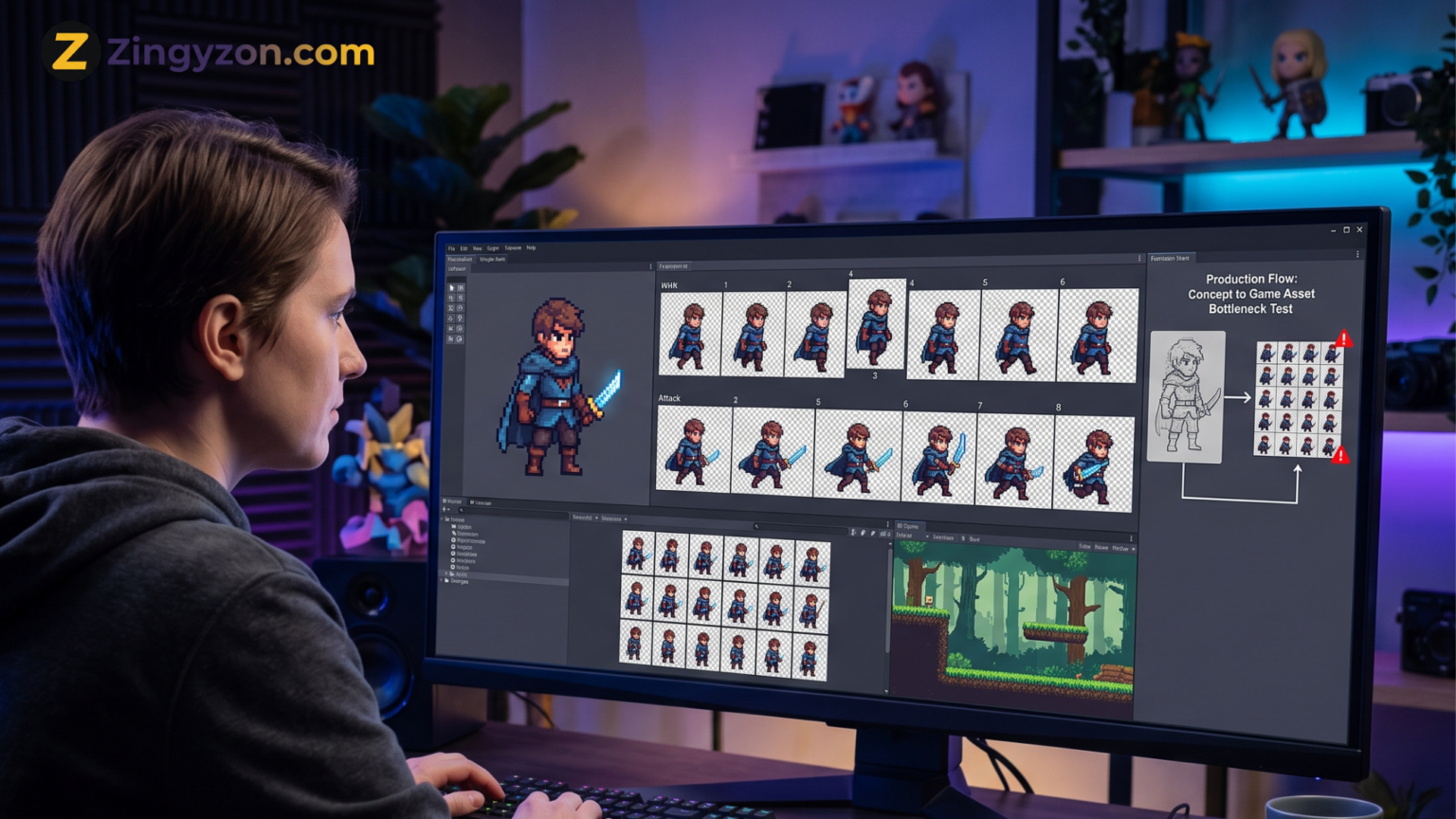
AI has changed how game developers create concepts, characters, backgrounds, and visual effects. A prompt can now turn a basic idea into a detailed image within seconds. However, creating one attractive image is very different from building a complete set of usable game assets.
That difference becomes clear when you try to create sprites.
A game sprite must do more than look good. It needs a clear silhouette, a transparent background, consistent proportions, correct animation frames, a controlled color palette, and proper alignment. It must also work inside a real game engine without requiring hours of repair.
This is where the sprite bottleneck appears.
To see how useful modern sprite-generation technology really is, I examined an AI sprite generator as part of a complete production-style workflow. The goal was not simply to generate a nice character. The goal was to take that character from an initial idea to a usable sprite sheet that could be imported into a game project.
The experience showed that AI can remove several frustrating parts of sprite creation. It also showed that the most difficult problems have not completely disappeared.
What Is the Sprite Bottleneck?
The sprite bottleneck is the gap between having a character idea and having a complete set of production-ready game animations.
A developer may already know what the character should look like. They may even have finished concept art. However, that character still needs idle, walking, running, jumping, attacking, taking damage, and other animation cycles.
Each animation needs several frames. Every frame must maintain the same:
- Character height
- Clothing design
- Weapon shape
- Color palette
- Viewing angle
- Pixel density
- Body proportions
- Lighting direction
A small change can create a visible problem during animation. A sword that changes length between frames will appear to shake. A character whose head changes size will look unstable. Even a one-pixel shift in the feet can make a walk cycle appear to slide across the ground.
For a single character, these issues may be manageable. For a game containing dozens of heroes, enemies, creatures, and non-player characters, sprite production can become one of the slowest parts of development.
This is the problem an AI Sprite Generator is expected to solve.
Setting Up a Real Production Test
A simple prompt was not enough for this workflow. The generator needed to be tested in the same way a small game studio might use it.
The production brief included a side-view fantasy character designed for a 2D action game. The character needed a readable shape, a limited pixel-art palette, a transparent background, and enough detail to remain clear at a small size.
The required animations included:
- Idle
- Walk
- Run
- Attack
- Jump
- Damage reaction
This was an important part of the test. A tool may create one good idle pose, but that does not prove it can maintain the character across several movements.
Modern sprite platforms commonly advertise features such as text-based animation, reference-image generation, directional character views, inpainting, and style matching. Some also support tilesets, environments, UI assets, and automated sprite sheets.
The real question is whether these features can survive a connected workflow.
Stage One: Creating the Base Character
The first step was generating the main character design.
The prompt described the character’s clothing, body shape, weapon, viewing angle, colors, and intended game style. It also included restrictions to prevent common problems.
For example, the prompt asked for:
- A full-body side view
- A fixed standing pose
- A simple silhouette
- No background
- No dramatic lighting
- No motion blur
- No extra weapons
- A limited color palette
The first outputs were visually strong. They looked like characters that could appear in a polished indie game. The generator handled the general theme, clothing, and color direction well.
However, attractive concept art is not automatically a usable sprite.
Some versions contained too much detail for the intended sprite size. Small buckles, fabric patterns, hair strands, and glowing effects looked impressive in the large preview but became visual noise when reduced.
This revealed the first important lesson: AI often tries to add detail, while good sprite design often requires removing it.
A successful base sprite needs to be easy to read during movement. Clear shapes are usually more valuable than tiny decorative elements.
Stage Two: Locking the Character Design
After selecting the strongest base image, the next task was keeping the character consistent.
This is where reference images became important. Instead of asking the tool to recreate the same character from text every time, the selected design was used as the visual reference for later generations.
The reference improved consistency, but it did not completely lock every feature.
During different poses, the generator sometimes changed small parts of the design. A shoulder guard became larger. A belt moved higher. A boot gained an extra detail. The weapon shape changed slightly.
Each change looked harmless when viewed as a separate image. During animation, however, the differences became much easier to notice.
Character consistency remains a known challenge in generative animation. Research into image animation often focuses on preserving appearance and identity between frames because details can drift as movement changes.
The most effective approach was to simplify the design before generating more frames. Fewer accessories meant fewer details for the system to change.
That may sound like a limitation, but it is also a useful design rule. A clean sprite is easier for the player to understand and easier for AI to reproduce.
Stage Three: Generating the Idle Animation
The idle cycle was the easiest animation to create.
Because the character remained in one position, the generator only needed to produce small movements. These included slight breathing, minor clothing motion, and a small change in posture.
The basic motion looked convincing. It gave the character life without making the animation too busy.
The main issue was alignment.
Although the frames looked similar, the character’s feet were not always placed on the exact same horizontal line. When previewed as an animation, the character appeared to move slightly upward and downward.
This was fixed by placing each frame on a shared canvas and aligning the feet to the same baseline.
It was not a difficult repair, but it showed an important difference between generation and production. The AI created the visual movement, while a human still needed to check the technical placement.
Stage Four: Building a Walk Cycle
The walk cycle exposed more serious problems.
Walking depends on clear contact poses, passing positions, weight changes, and correct leg movement. The character must also travel in a believable way without changing size.
The generator produced recognizable walking frames, but not every frame connected smoothly to the next one.
In some attempts, the front and back legs became difficult to identify. In others, the weapon moved independently from the arm. A few frames looked good alone but created an awkward movement when played in order.
The strongest result came from using a more controlled instruction. Instead of simply asking for a walking animation, the prompt defined the required motion:
“Create a side-view walking cycle with clear contact, passing, down, and up poses. Keep the character height, weapon size, clothing, palette, and ground line consistent.”
This reduced random movement and gave the generator a clearer structure.
Even then, the cycle needed manual cleanup. Several pixels around the feet, weapon, and clothing edges had to be corrected. One frame also needed a small leg adjustment to improve the motion.
The AI saved time by creating the starting frames. It did not remove the need for animation judgment.
Stage Five: Testing Run, Jump, and Attack Animations
The run animation performed better than expected because the movement could be exaggerated. Larger arm and leg positions made the action easier to read.
The jump cycle was more difficult.
A jump is not simply a character floating upward. It needs preparation, takeoff, time in the air, and landing. Without those stages, the animation feels weak.
The generated frames captured the general idea, but the timing still needed to be adjusted in the animation editor. The takeoff frame needed to play quickly, while the airborne frame needed slightly more screen time.
The attack animation created the biggest consistency challenge.
Fast movement caused the weapon and hands to change shape. The generator also added motion effects that did not match the clean pixel-art style. These effects looked impressive in a still image but became distracting during gameplay.
The best solution was to generate the main attack poses first and add the in-between frames separately. This created more control over the movement and reduced design drift.
This pose-first approach was more dependable than asking the tool to produce a complete, perfect attack cycle in one attempt.
Stage Six: Removing Backgrounds and Cleaning Edges
Transparent backgrounds are necessary for most sprite workflows.
The generator’s background-removal feature handled large empty areas well, but some difficult edges still needed attention. Hair, cloth, weapon tips, and small gaps between the arms and body occasionally contained unwanted pixels.
These pixels may be hard to see on a checkerboard background. They become obvious when the sprite is placed over a bright game environment.
Each frame therefore needed to be tested against several background colors.
Edge cleanup was one of the most repetitive parts of the workflow. It was also one of the areas where automation provided the clearest benefit. The tool removed most of the background, leaving only small repairs instead of requiring every frame to be cut out manually.
Stage Seven: Creating the Sprite Sheet
Once the individual frames were cleaned, they were placed into a sprite sheet.
A good sprite sheet requires more than arranging images in rows. Every cell must have the same dimensions, and each character must be positioned around a stable origin point.
The frames were organized by animation:
- First row: Idle
- Second row: Walk
- Third row: Run
- Fourth row: Attack
- Fifth row: Jump
- Sixth row: Damage reaction
Consistent cell size made the sheet easier to slice inside the game engine. It also prevented animation frames from shifting because of different image boundaries.
The generator helped with the visual content, but sprite-sheet organization still needed careful checking. Automatic exports can be useful, yet developers should confirm frame order, padding, dimensions, transparency, and file naming before import.
Stage Eight: Importing the Assets Into a Game Engine
The final test was importing the sheet into a basic 2D game project.
This stage revealed problems that were easy to miss during generation.
The walk cycle needed a small speed adjustment. The attack animation needed a longer final frame so the hit felt stronger. The jump animation needed a more stable landing pose. A few leftover edge pixels also became visible against the game background.
None of these issues required the entire asset to be recreated. They were normal production adjustments.
That distinction matters.
An AI-generated asset does not need to be perfect to be useful. It needs to provide a strong enough starting point that correction takes less time than creating everything from the beginning.
Where the AI Sprite Generator Saved Time
The tool was most useful during early production and controlled variation.
It helped with:
- Exploring character ideas
- Testing color palettes
- Producing pose options
- Creating rough animation frames
- Removing most background areas
- Generating alternate clothing
- Building early prototypes
- Creating temporary game assets
For solo developers, these benefits can be significant. A programmer can test movement and combat before hiring an artist for final assets. A designer can compare several visual directions without drawing each one manually.
Small studios may also use AI-generated frames as rough material for an experienced pixel artist to clean and standardize.
Where the Bottleneck Still Exists
The sprite bottleneck has not vanished. It has moved.
Before AI, much of the time was spent drawing the first version of each frame. With AI, more time may be spent selecting, correcting, aligning, simplifying, and checking generated frames.
The remaining problems include:
- Character details changing between frames
- Poor hand and weapon shapes
- Unstable pixel density
- Incorrect foot placement
- Weak animation timing
- Unwanted background pixels
- Inconsistent lighting
- Excessive detail
- Incorrect frame order
These issues are manageable, but they matter when developers are producing hundreds or thousands of assets.
A tool that saves ten minutes during generation but adds twenty minutes of cleanup has not solved the workflow problem. Production value depends on the entire process, not the speed of the first output.
The Best Workflow Is AI Plus Human Control
The most dependable approach is not full automation. It is a hybrid workflow.
AI is effective at creating options, suggesting poses, and producing a first visual draft. Human artists and developers remain important for consistency, animation timing, technical cleanup, and final quality control.
A practical workflow looks like this:
- Write a strict character brief.
- Generate several base designs.
- Select and simplify one design.
- Use it as the main reference image.
- Generate key animation poses first.
- Create in-between frames separately.
- Align every frame to one baseline.
- Limit and correct the color palette.
- Remove unwanted edge pixels.
- Test the animation inside the game engine.
This method treats AI as part of production instead of treating it as a one-click replacement for production.
Readers can explore more guides covering AI tools, online platforms, and practical technology topics on Zingyzon.
Is an AI Sprite Generator Ready for Professional Production?
The answer depends on the project.
For prototypes, game jams, personal projects, background characters, and early concept testing, AI sprite tools can be highly useful. They reduce the time required to move from an idea to something visible and playable.
For a commercial game with a strict art direction, the generated material will usually need review and cleanup. The more complex the character and animation, the more human control becomes necessary.
The technology is not useless because it needs correction. Traditional animation also requires revision. The more important question is whether AI reduces the total amount of work.
In a controlled workflow, it often can.
However, developers should judge a generator by the quality of its final imported assets, not by the beauty of its preview images.
Final Verdict
The sprite bottleneck is real because game assets must remain consistent across poses, frames, animations, and environments.
AI can now generate impressive sprite concepts and useful animation drafts. It can speed up experimentation and help small teams create more visual content. However, generation is only the first part of the job.
The hardest work now happens between the generated image and the finished game asset.
That middle stage includes design locking, frame correction, alignment, palette control, background cleanup, timing, export, and engine testing.
The new generation of AI sprite tools is valuable, but the strongest results come when developers combine automated generation with careful human direction.
AI may not remove the sprite bottleneck completely. It can, however, make that bottleneck narrower, faster, and easier to manage.
Frequently Asked Questions
What does an AI sprite generator do?
It uses text prompts or reference images to create 2D game characters, poses, animation frames, pixel-art objects, or complete sprite sheets.
Can AI-generated sprites be used directly in a game?
Some simple assets may be usable with limited changes. Animated characters usually require alignment, consistency checks, background cleanup, frame ordering, and testing inside the game engine.
Can AI maintain the same character across every frame?
Reference images and controlled prompts can improve consistency, but small details may still change. Clothing, weapons, body proportions, and colors should be checked carefully.
Is an AI sprite generator useful for indie developers?
Yes. It can help indie developers create prototypes, test character ideas, produce temporary assets, and reduce the amount of manual work required during early production.
Does AI replace pixel artists?
AI can automate parts of generation, but skilled artists remain important for art direction, pixel cleanup, animation quality, consistency, and final production decisions.
What is the best way to generate a sprite animation?
Start with a clear base character. Lock the design with a reference image, generate key poses, build the in-between frames, align every image, and test the animation inside the target game engine.
What should developers check before exporting a sprite sheet?
Check the frame dimensions, transparency, frame order, baseline alignment, color palette, spacing, file format, animation timing, and compatibility with the chosen game engine.



Keep Exploring Zingyzon.com
Read more Zingyzon SEO, digital marketing, online earning, business, and technology guides for Australia, USA, and global readers.